Create New Model Form - Part 1
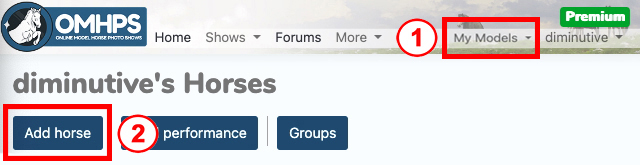
When you tap the "Add Model" button, you begin work in the Horse tab.
-
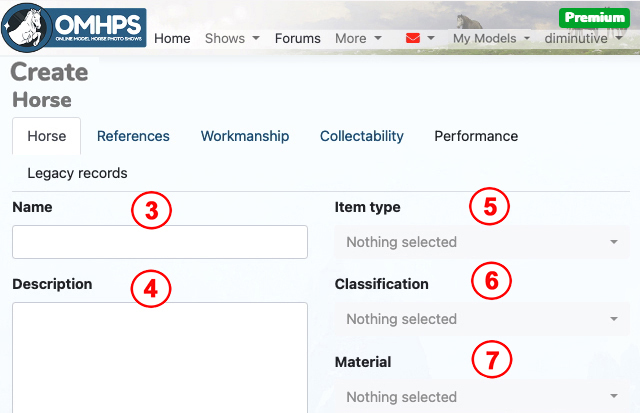
Enter your model’s Name. Please *do not use Breyer's name for the model;* this makes stewarding hard.
-
Enter a Description for your model.
- For all OF models, identify the edition name (Breyer’s name for the run, such as "Lafayette").
- For OF collectibility entries, include the mold name (e.g., "Hamilton"). You can also use this area to write in any required collectibility info not identified in the drop-down menus.
- For CM models, identify the mold used (e.g., Alborozo).
- If your horse's color is hard to identify, you may also want to identify it here, especially if it is Rare, Historical or Restricted. (note: judges cannot see Workmanship tab info).
- DO NOT add any info that may identify you as the owner.
-
Select Item type. Pick Equid Figurine (Horse) for horses/longears and Other Animal Figurine for other animals.
-
Select Classification. For original finish Breyer, select Original Finish Plastic. For original finish CollectA, select Original Finish Rubber/PVC. For customs, select Custom.
-
Select Material. For Breyer, select Plastic and for CollectA, select Rubber/PVC.